
A review adds **no panel of its own**. It routes its data into three panels CodeTracer already has — the VCS panel, the Editor, and the Agent Activity panel — and leaves your layout otherwise alone.
The VCS panel
The VCS panel is the review's navigation surface, and it is the visible tab of whatever stack hosts it when the review opens.
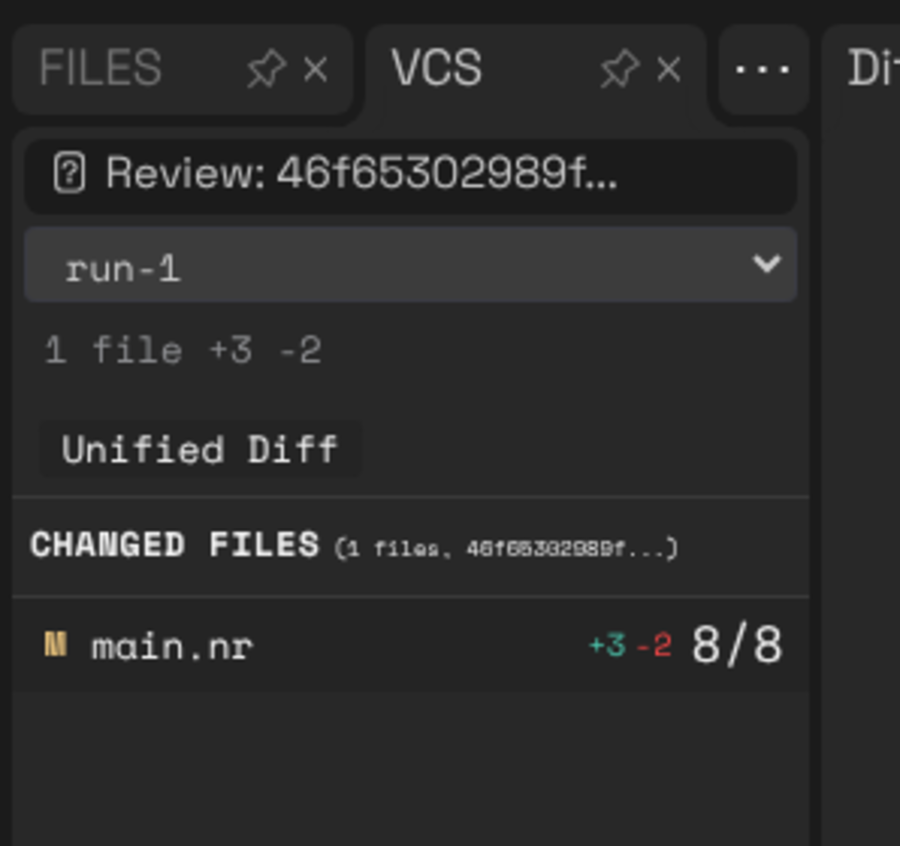
- **Header** —
Review: <commit>and the review's totals (1 file +3 -2). - **Trace-context selector** — a dropdown naming the recordings the dataset was
collected from (run-1, run-2). It appears only when the dataset carries more than one, and today it **names** them without filtering by them — see Not yet available.
- **
Unified Difftoggle** — active means clicking a file opens its **diff
tab**; inactive means clicking opens the **full file**. It changes what a click does, not what the panel renders.
- **Changed files** — one row per file with its status letter (
M,A,D,
R), its +/− counts, and a coverage badge (8/8 above).
Clicking a row opens that file. A review does not concatenate every file into one scrolling document; cross-file navigation is this list.
The changeset is immutable, so a review offers no refresh and no file watching.
The diff tab
The diff tab is an ordinary Monaco editor tab, so search, selection, copy, minimap and keyboard navigation all work inside it. It shows one file: a header line with the path and its counts, @@ hunk headers, added lines in green with +, removed lines in red with −, and context lines on the normal background.
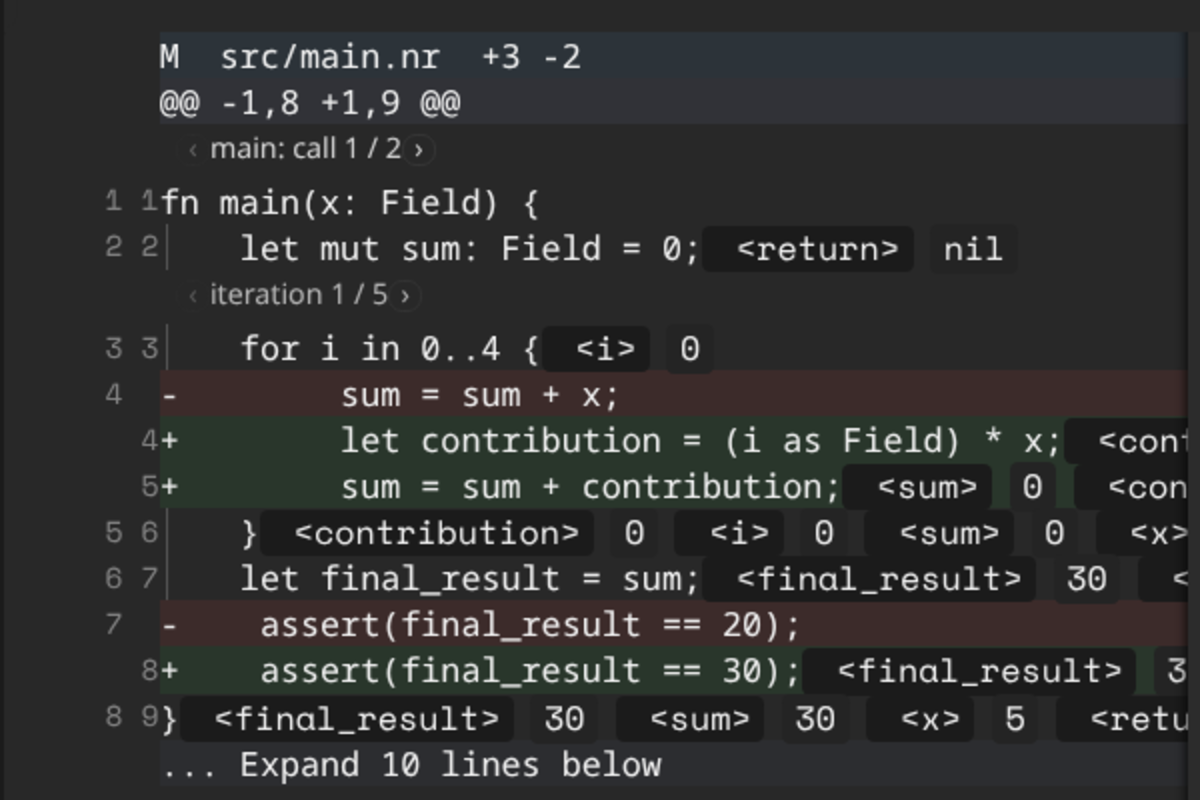
**Context expansion.** ... Expand 10 lines above / ... Expand 10 lines below reveal more of the surrounding file, ten lines at a time, and repeat. In a review this is a local slice: the dataset already carries each changed file's full source, so nothing is fetched. Revealed lines are normal code lines and pick up the flow overlay like any other.
**Hunk selection.** Click a hunk header to select it, shift-click for a range, ctrl-click to toggle one. The toolbar shows the count and offers **Copy** (the selection as a patch) and **Clear**. Staging, discarding and moving hunks between commits are *not* offered in a review — there is no working tree to stage into.
The flow overlay
This is the part a diff on its own cannot give you. Every line the recording executed carries the standard Omniscience annotations, produced by the same code that renders them during ordinary debugging:
- **Executed / not executed shading** on each line inside a recorded function.
- **Inline value chips** at the end of the line — a name chip (
<contribution>)
and a value chip (0) — in the same style the debugger's value boxes use. Values are never rendered as // comments.
- **An invocation stepper** anchored above each recorded function
(‹ main: call 1 / 2 ›). A function that ran more than once has more than one invocation, and the stepper chooses which one the values describe.
- **A loop-iteration stepper** anchored above each loop the selected invocation
entered (‹ iteration 1 / 5 ›), so a line inside a loop shows the values of the pass you asked for. It clamps at both ends and disappears for a loop entered only once.
In the example from Collecting a review, stepping the loop control walks contribution through 0, 5, 10, 15 — the four terms the change introduced — and sum through their running total, on the same lines the diff added.
The loop stepper counts the **passes over the loop's header line** that this invocation recorded. For the for i in 0..4 above that is five, not four: four iterations plus the final exit test, which is a real recorded step with no i.
Lines with no recorded steps — including comments, which no collector reports — are shaded as not executed.
Both controls are **steppers**: previous/next buttons and a counter. The debugger's draggable loop slider is not offered here.
The Agent Activity panel
The third pillar. Its primary content in a review is **the agent session that produced the dataset**, so you can read what the agent actually did in the run leading up to it.
The session is loaded **by reference**: a dataset stores the session id and enough context to resolve it against the agent backend (Agent Harbor, or an ACP agent that advertises session/load). No transcript is copied into the file, so a dataset never goes stale against the session and sharing a dataset does not share the conversation.
ct review collect records the reference automatically when it is run inside an agent session — it reads CODETRACER_AGENT_SESSION_ID and friends, the variables the harness already exports:
Review dataset ready: .ct/review/review.json
Associated with agent session: rv8-demo-session (acp)
Open it with: ct review .ct/review
A dataset with no session reference is a complete review; the panel simply shows no conversation. When a reference cannot be resolved the panel says which of the three things went wrong, in one sentence, rather than rendering an empty conversation that reads as "the agent did nothing":
- the agent cannot replay sessions,
- the session could not be fetched (quoting the backend's own reason),
- the session loaded but contains no messages.
The panel shows the session and nothing else — there is no summary of the dataset beside it. Coverage is reported where you are already choosing a file: as a badge on the VCS panel's changed-file rows, reading 15/17 when the dataset has coverage for that file and staying **empty** when it does not. An empty badge means *not measured*; you will not see a 0/0 standing in for it.
Full Files mode
Turning the VCS panel's Unified Diff toggle off makes a click open the whole file in the normal editor instead, with diff highlights on the modified lines and the same flow overlay — the same value chips, the same shading — wherever the dataset has data for the loaded file.
Full Files mode has **no controls of its own**. It follows the invocation and loop-iteration choices made with the diff tab's steppers, so the two surfaces always agree about which call they are showing.
See also
- Collecting a review — producing the dataset the
panels above are reading.
- Not yet available — what these surfaces do
not do yet.
- Graphical User Interface — the panels outside a review.